sketchucation logo sketchucation
    • 登入
    Oops, your profile's looking a bit empty! To help us tailor your experience, please fill in key details like your SketchUp version, skill level, operating system, and more. Update and save your info on your profile page today!
    🔌 Smart Spline | Fluid way to handle splines for furniture design and complex structures. Download

    [Plugin][$] JointPushPull Interactive - v4.9a - 02 Apr 25


    已排程 已置頂 已鎖定 已移動 Plugins
    619 貼文 156 Posters 656.4k 瀏覽 155 Watching
    正在載入更多貼文
    • 從舊到新
    • 從新到舊
    • 最多點贊
    回覆
    • 在新貼文中回覆
    登入後回覆
    此主題已被刪除。只有擁有主題管理權限的使用者可以查看。
    • B 離線
      BorgMan
      最後由 編輯

      By the by, I got this error when opening SketchUp. Does this help out?


      Sketchup error.txt

      More varied than the Borg, more powerful than the living dead, and better shots than Imperial Stormtroopers.

      You've gotta love Slivers.

      1 條回覆 最後回覆 回覆 引用 0
      • TIGT 離線
        TIG Moderator
        最後由 編輯

        @borgman said:

        By the by, I got this error when opening SketchUp. Does this help out?
        That is most likely because you have not updated to SketchUp v2014M1 which fixes a known issue.
        In SketchUp v2014M0 PC if you launch SketchUp by opening a SKP that is on a drive other than the drive where SketchUp.exe is located then it messes the S: list.
        Thus the Ruby2 stuff never gets loaded and tools like the SCFapi that rely on some functions fail.

        You should find that starting SketchUp from the menu and then opening a SKP does NOT create this issue.
        There is a fix rb file that went into Tools and sorted the $: out, BUT simply installing SketchUp v2014M1 is advisable, as it also fixes a few other glitches under the hood.

        TIG

        1 條回覆 最後回覆 回覆 引用 0
        • C 離線
          cosmorobus
          最後由 編輯

          not selected polygons. What's the problem?
          I have
          Fredo6_JointPushPull - v3.2b - 17 Mar 14
          LibFredo6_v6.0b
          Sketchup 14.0.4900

          1 條回覆 最後回覆 回覆 引用 0
          • I 離線
            interior_design
            最後由 編輯

            It is really helpful in modeling which gives more precise and flexible design, indeed.
            Many thanks to the author: Fredo.

            1 條回覆 最後回覆 回覆 引用 0
            • L 離線
              littleche
              最後由 編輯

              Hi

              I have a problem with JointPushPull ...
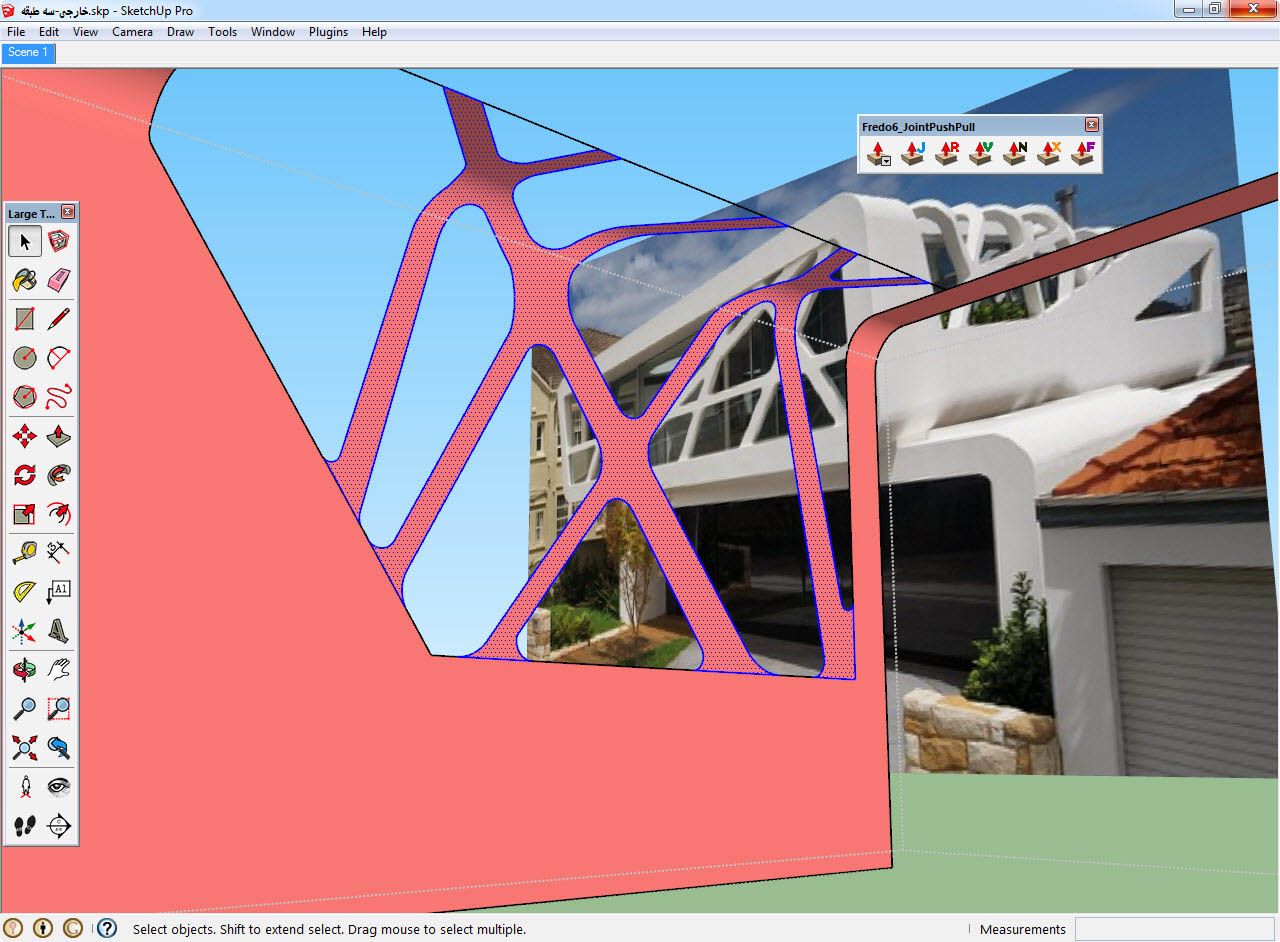
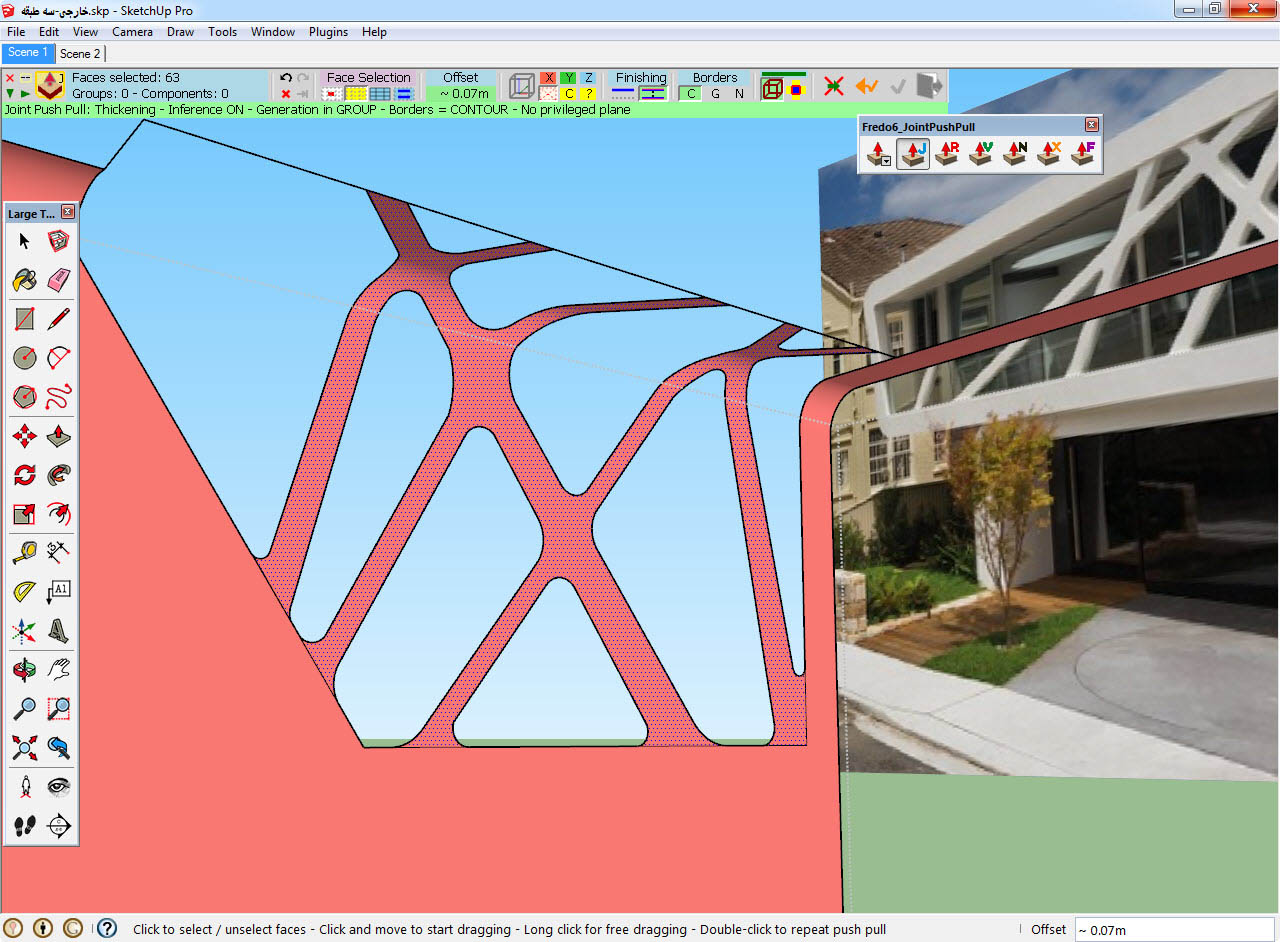
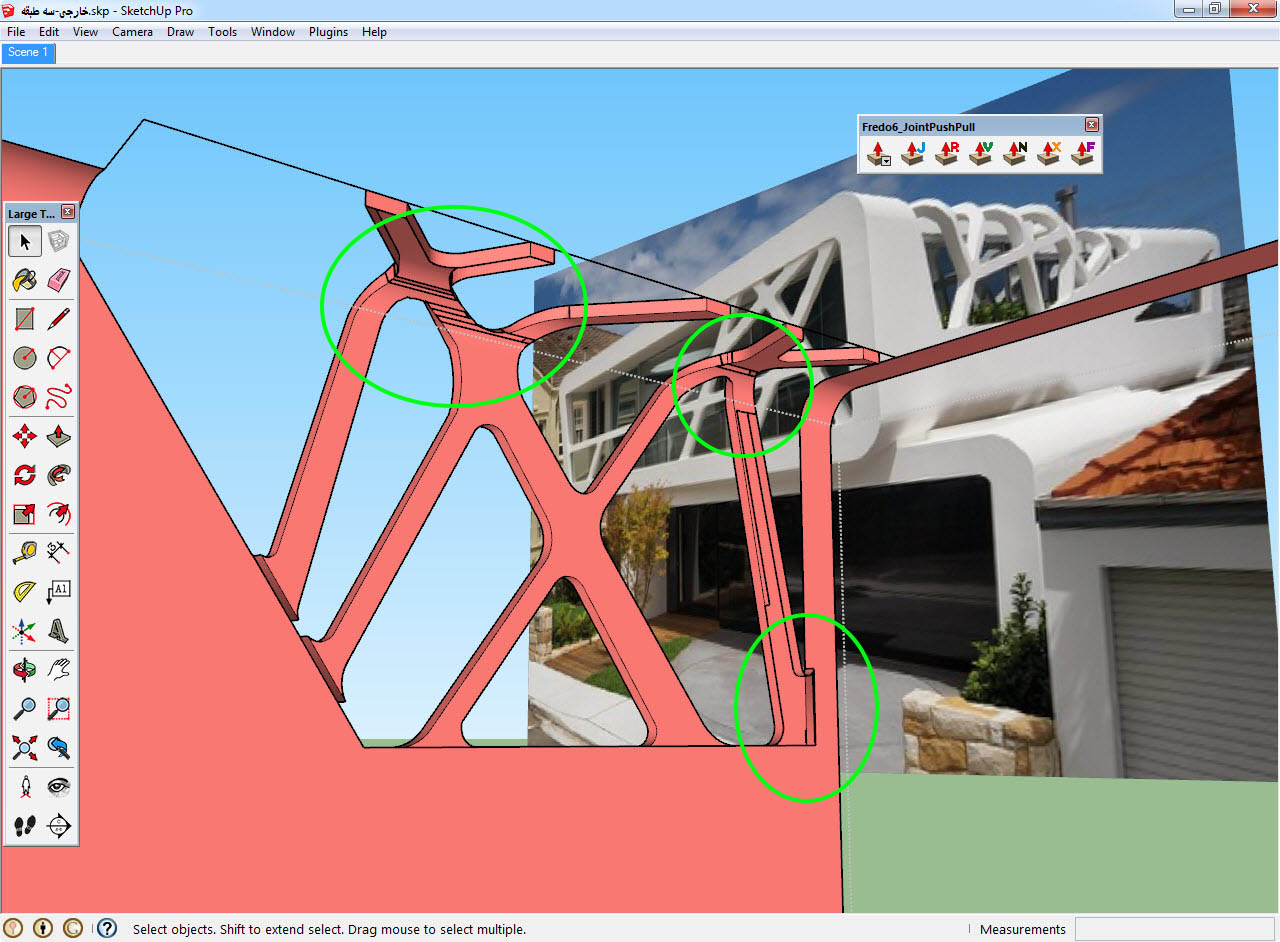
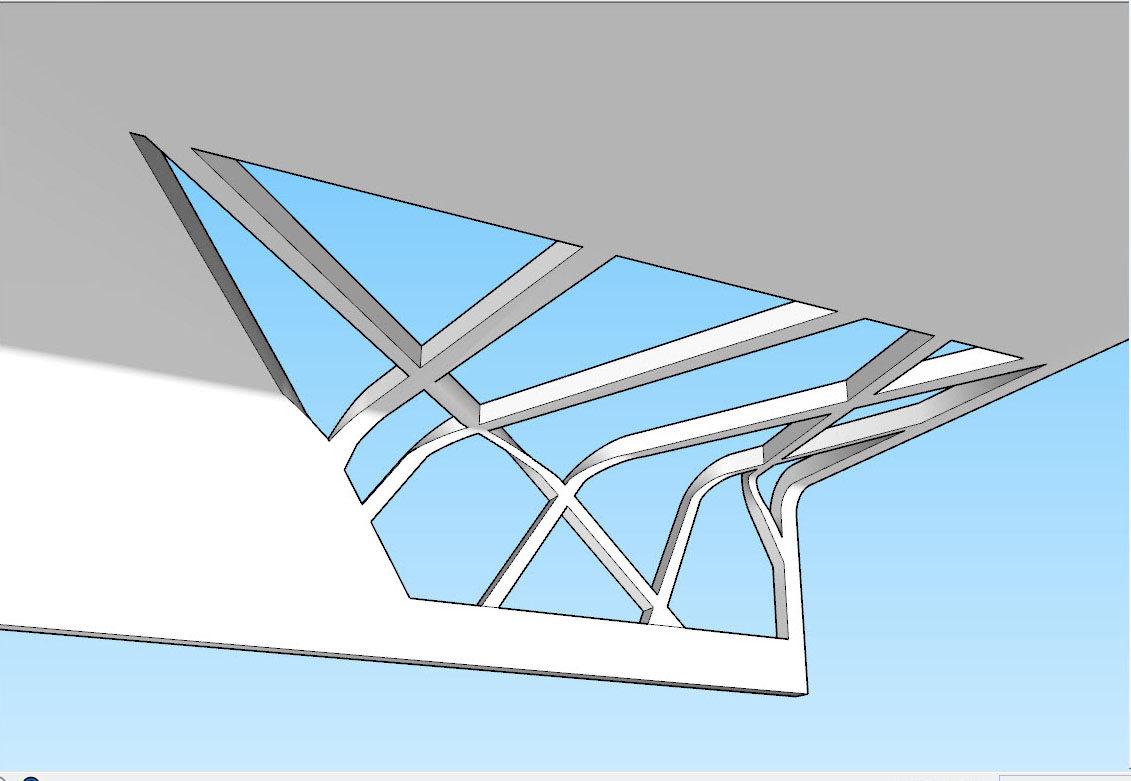
              As you can see in the picture ,I can not pull this face Properly.
              The parts that I've marked with a green line ,JointPushPull is destroyed face .

              What can I do to fix this problem? ❓
              1.jpg
              1.5.jpg
              2.jpg
              JP&P.skp

              1 條回覆 最後回覆 回覆 引用 0
              • Dave RD 離線
                Dave R
                最後由 編輯

                Well, to start with, you've got some reversed faces. Instead of fixing them, you've tried to mask them by making the front and back faces the same color. That's not the right way to take care of the problem. Correct the face orientation and try again.

                Then try scaling up by maybe 100 to avoid smaller faces.

                Etaoin Shrdlu

                %

                (THERE'S NO PLACE LIKE)

                G28 X0.0 Y0.0 Z0.0

                M30

                %

                1 條回覆 最後回覆 回覆 引用 0
                • BoxB 離線
                  Box
                  最後由 編輯

                  Apart from the reversed faces that Dave has pointed out, you have a layer other than Layer0 as the active layer, always keep 0 active, keep all raw geometry on Layer0 and only place groups or components on other layers. Also your linework is bad. Your edges are rough and don't form clean curves.

                  1 條回覆 最後回覆 回覆 引用 0
                  • Dave RD 離線
                    Dave R
                    最後由 編輯

                    Indeed! And as is typical of computer stuff, GIGO applies here.

                    Etaoin Shrdlu

                    %

                    (THERE'S NO PLACE LIKE)

                    G28 X0.0 Y0.0 Z0.0

                    M30

                    %

                    1 條回覆 最後回覆 回覆 引用 0
                    • BoxB 離線
                      Box
                      最後由 編輯

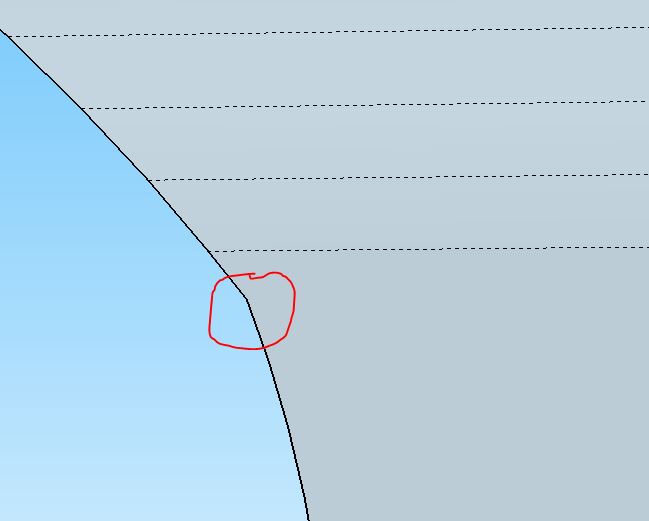
                      Just a couple of examples to show you what you need to fix.
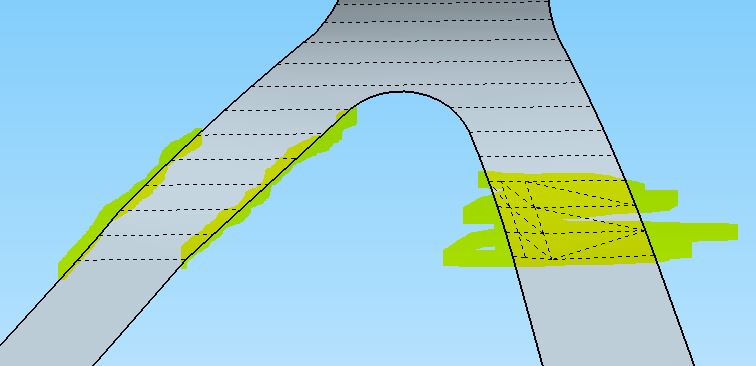

                      This whole section is twisted


                      The red circle shows where the edge is kinked without any corresponding geometry.

                      1 條回覆 最後回覆 回覆 引用 0
                      • L 離線
                        littleche
                        最後由 編輯

                        "Dave R" & "Box" Thanks for your help ...
                        revers and oriant face does not affect the performance of jointP&P plugin.

                        Yes, I agree my linework is bad but in bad line plugin good working !
                        I have tried many different ways But according to the your advice I still was not able to reach my goal.Another way to tell if it is possible ...

                        Is not this a bug in the plugin?

                        1 條回覆 最後回覆 回覆 引用 0
                        • Dave RD 離線
                          Dave R
                          最後由 編輯

                          It would be nice to blame the plugin because your bad line work is causing the problem, wouldn't it? 😒

                          Etaoin Shrdlu

                          %

                          (THERE'S NO PLACE LIKE)

                          G28 X0.0 Y0.0 Z0.0

                          M30

                          %

                          1 條回覆 最後回覆 回覆 引用 0
                          • BoxB 離線
                            Box
                            最後由 編輯

                            It's not a fault with the plugin, it is attempting to follow what you have drawn.

                            Get everything on the same layer and clean up your geometry and the plugin works.
                            I've no idea how you drew it in the first place but perhaps it would be easier to start again and get the geometry right rather than trying to repair it.
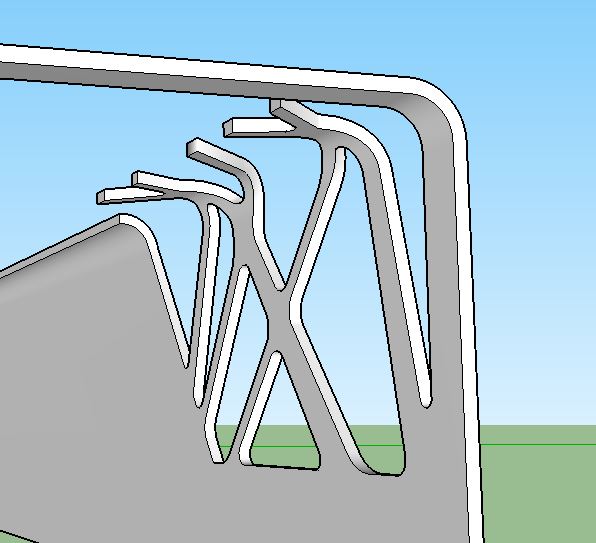

                            Repaired.JPG

                            1 條回覆 最後回覆 回覆 引用 0
                            • L 離線
                              littleche
                              最後由 編輯

                              This problem was solved! Thank you for your help ... my worklin was very bad .I got to practice tips that you said and Finally I drew a good workline with tools on surface plugin and jointpull&push It's nice to end. 😍

                              and Again, thanks ... 👍

                              09-27-2014 04-34-39 ب.jpg

                              1 條回覆 最後回覆 回覆 引用 0
                              • BoxB 離線
                                Box
                                最後由 編輯

                                Well done.
                                Learning to get your structure right in the first place is far better for you than getting a plugin to work.

                                1 條回覆 最後回覆 回覆 引用 0
                                • fredo6F 離線
                                  fredo6
                                  最後由 編輯

                                  NEW RELEASE: JointPush Pull Interactive v3.3a - 19 Oct 14

                                  JointPushPull Interactive 3.3a is required for the support of usernames with non-ascii characters in Sketchup 2014

                                  See main post of this thread for Download of JointPushPull.

                                  Fredo

                                  1 條回覆 最後回覆 回覆 引用 0
                                  • M 離線
                                    mvsuriano
                                    最後由 編輯

                                    Hello - I've been using the old version of JPP for some time - its awesome. Recently tried to install the newest version via SketchUcation tools in SU 2014.

                                    I see the toolbar, however, clicking on any button/tool in the JPP toolbar doesn't do anything, it just defaults to the tool I had selected prior.

                                    Any suggestions?

                                    Thanks!
                                    Mike

                                    1 條回覆 最後回覆 回覆 引用 0
                                    • cottyC 離線
                                      cotty
                                      最後由 編輯

                                      @mvsuriano said:

                                      Hello - I've been using the old version of JPP for some time - its awesome. Recently tried to install the newest version via SketchUcation tools in SU 2014.

                                      I see the toolbar, however, clicking on any button/tool in the JPP toolbar doesn't do anything, it just defaults to the tool I had selected prior.

                                      Any suggestions?

                                      Thanks!
                                      Mike

                                      Did you update LibFredo to version >=6.3? Are there error messages in the ruby console?

                                      my SketchUp gallery

                                      1 條回覆 最後回覆 回覆 引用 0
                                      • fredo6F 離線
                                        fredo6
                                        最後由 編輯

                                        @mvsuriano,

                                        Could you open the Ruby Console before clicking on the JPP icon, in case there are error messages displayed

                                        Fredo

                                        1 條回覆 最後回覆 回覆 引用 0
                                        • M 離線
                                          mvsuriano
                                          最後由 編輯

                                          @fredo6 said:

                                          @mvsuriano,

                                          Could you open the Ruby Console before clicking on the JPP icon, in case there are error messages displayed

                                          Fredo

                                          HI Fredo - turns out I do have an error. I did update to FredoLib 6.3a prior to install. This is the error I get.

                                          Error: #<NameError: uninitialized constant G6::ShapeGrid>
                                          C:/Users/msuriano/AppData/Roaming/SketchUp/SketchUp 2014/SketchUp/Plugins/Fredo6_JointPushPull/JointPushPullTool.rb:101:in initialize' C:/Users/msuriano/AppData/Roaming/SketchUp/SketchUp 2014/SketchUp/Plugins/Fredo6_JointPushPull/JointPushPullTool.rb:64:in new'
                                          C:/Users/msuriano/AppData/Roaming/SketchUp/SketchUp 2014/SketchUp/Plugins/Fredo6_JointPushPull/JointPushPullTool.rb:64:in action__mapping' C:/Users/msuriano/AppData/Roaming/SketchUp/SketchUp 2014/SketchUp/Plugins/Fredo6_!LibFredo6/Lib6Plugin.rb:133:in call'
                                          C:/Users/msuriano/AppData/Roaming/SketchUp/SketchUp 2014/SketchUp/Plugins/Fredo6_!LibFredo6/Lib6Plugin.rb:133:in launch_action' C:/Users/msuriano/AppData/Roaming/SketchUp/SketchUp 2014/SketchUp/Plugins/Fredo6_JointPushPull/bootstrap_JointPushPull.rb:81:in launch_action'
                                          C:/Users/msuriano/AppData/Roaming/SketchUp/SketchUp 2014/SketchUp/Plugins/Fredo6_JointPushPull/bootstrap_JointPushPull.rb:128:in block in declare_command' C:/Users/msuriano/AppData/Roaming/SketchUp/SketchUp 2014/SketchUp/Plugins/Fredo6_!LibFredo6/Lib6Plugin.rb:1080:in call'
                                          C:/Users/msuriano/AppData/Roaming/SketchUp/SketchUp 2014/SketchUp/Plugins/Fredo6_!LibFredo6/Lib6Plugin.rb:1080:in command_invoke' C:/Users/msuriano/AppData/Roaming/SketchUp/SketchUp 2014/SketchUp/Plugins/Fredo6_!LibFredo6/Lib6Plugin.rb:1062:in block (2 levels) in build_config_commands'
                                          C:/Users/msuriano/AppData/Roaming/SketchUp/SketchUp 2014/SketchUp/Plugins/Fredo6_!LibFredo6/Lib6Traductor.rb:1077:in call' C:/Users/msuriano/AppData/Roaming/SketchUp/SketchUp 2014/SketchUp/Plugins/Fredo6_!LibFredo6/Lib6Traductor.rb:1077:in block in add_command'
                                          -e:1:in `call'

                                          1 條回覆 最後回覆 回覆 引用 0
                                          • Dave RD 離線
                                            Dave R
                                            最後由 編輯

                                            Try deleting the LibFredo6 files/folder from the Plugins folder and install the current version again. I had a problem due to some file not getting removed/overwritten when I installed the latest version. Deleting and installing fresh took care of it though.


                                            Etaoin Shrdlu

                                            %

                                            (THERE'S NO PLACE LIKE)

                                            G28 X0.0 Y0.0 Z0.0

                                            M30

                                            %

                                            1 條回覆 最後回覆 回覆 引用 0
                                            • 1
                                            • 2
                                            • 11
                                            • 12
                                            • 13
                                            • 14
                                            • 15
                                            • 30
                                            • 31
                                            • 13 / 31
                                            • 第一個貼文
                                              最後的貼文
                                            Buy SketchPlus
                                            Buy SUbD
                                            Buy WrapR
                                            Buy eBook
                                            Buy Modelur
                                            Buy Vertex Tools
                                            Buy SketchCuisine
                                            Buy FormFonts

                                            Advertisement