<?xml version="1.0" encoding="UTF-8"?><rss xmlns:dc="http://purl.org/dc/elements/1.1/" xmlns:content="http://purl.org/rss/1.0/modules/content/" xmlns:atom="http://www.w3.org/2005/Atom" version="2.0"><channel><title><![CDATA[Rounding corners to meet a curved face]]></title><description><![CDATA[<p dir="auto">Hello Sketchers!</p>
<p dir="auto">I've been tearing my hair out trying to sketch a bath-tub shaped component and would be grateful for any ideas you might have on how to go about it.  The component should be approximately cuboid with vertical sides and a base that tapers evenly to an off-centre hole; all corners should be rounded with the same radius.</p>
<p dir="auto">So far, I've used the Follow Me tool to create a funnel which I've then stretched to the appropriate dimensions to create the tapered base.  I created the sides by drawing their outline (including rounded corners) as seen from above and extruding the arising surface.  However, the combination of these two parts creates a sharp edge where the vertical side meets the tapered base; the join should be rounded <strong>with the same radius as between vertical faces</strong>.</p>
<p dir="auto">I have tried using Follow Me to take an appropriately sized circle around the join, but for it to remain tangental to both the vertical edge and the tapered base a more complex path is required and I have no idea how to begin calculating it... however, I'm probably going about this the wrong way!</p>
<p dir="auto">What do you guys recommend?</p>
]]></description><link>https://community.sketchucation.com/topic/133931/rounding-corners-to-meet-a-curved-face</link><generator>RSS for Node</generator><lastBuildDate>Sun, 17 May 2026 17:50:38 GMT</lastBuildDate><atom:link href="https://community.sketchucation.com/topic/133931.rss" rel="self" type="application/rss+xml"/><pubDate>Sat, 17 Mar 2012 23:21:15 GMT</pubDate><ttl>60</ttl><item><title><![CDATA[Reply to Rounding corners to meet a curved face on Tue, 20 Mar 2012 06:08:09 GMT]]></title><description><![CDATA[<p dir="auto">.</p>
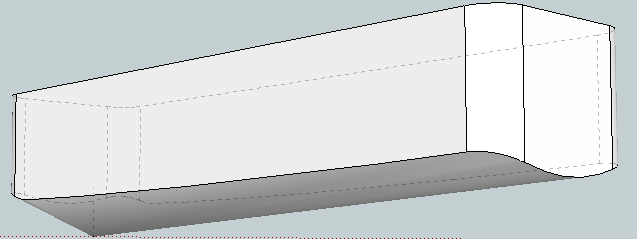
<p dir="auto">a quick go at it with curviloft.. could probably do it better on a second try.</p>
<p dir="auto"><a href="/uploads/imported_attachments/1icz_tubz.skp">tubz.skp</a></p>
<p dir="auto">.</p>
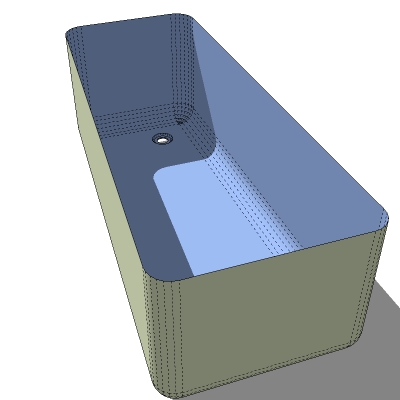
]]></description><link>https://community.sketchucation.com/post/1317039</link><guid isPermaLink="true">https://community.sketchucation.com/post/1317039</guid><dc:creator><![CDATA[jeff hammond]]></dc:creator><pubDate>Tue, 20 Mar 2012 06:08:09 GMT</pubDate></item><item><title><![CDATA[Reply to Rounding corners to meet a curved face on Mon, 19 Mar 2012 23:41:59 GMT]]></title><description><![CDATA[<p dir="auto">Well, with the round corner plugin, this is where I could get - but me also a bit of eye balling (and comparing your inner circle's size this way). Note that to avoid overkilling it, I used a 6 segmented rounding only.</p>
<p dir="auto">With curved edges, the plugin is never perfect either so here and there some manual correction is often needed.</p>
<hr />
<p dir="auto"><a href="/uploads/imported_attachments/ewA1_Tub.skp">Tub.skp</a></p>
]]></description><link>https://community.sketchucation.com/post/1317020</link><guid isPermaLink="true">https://community.sketchucation.com/post/1317020</guid><dc:creator><![CDATA[Gaieus]]></dc:creator><pubDate>Mon, 19 Mar 2012 23:41:59 GMT</pubDate></item><item><title><![CDATA[Reply to Rounding corners to meet a curved face on Mon, 19 Mar 2012 23:27:36 GMT]]></title><description><![CDATA[<p dir="auto"><a class="plugin-mentions-user plugin-mentions-a" href="/user/gaieus" aria-label="Profile: gaieus">@<bdi>gaieus</bdi></a> said:</p>
<blockquote>
<p dir="auto">Could you also attach the skp file?</p>
</blockquote>
<p dir="auto">Attached; as you can see, I have (somewhat painfully) manually calculated the path that the 125mm radius circle should follow to describe the desired rounded edges between base and sides - however, due to the inexact nature of this approach, the arising tube does not perfectly intersect those faces.</p>
<p dir="auto">No doubt there is an easier way!!</p>
<hr />
<p dir="auto"><a href="/uploads/imported_attachments/nSi5_Tub.skp">Tub.skp</a></p>
]]></description><link>https://community.sketchucation.com/post/1317019</link><guid isPermaLink="true">https://community.sketchucation.com/post/1317019</guid><dc:creator><![CDATA[eggyal]]></dc:creator><pubDate>Mon, 19 Mar 2012 23:27:36 GMT</pubDate></item><item><title><![CDATA[Reply to Rounding corners to meet a curved face on Mon, 19 Mar 2012 21:39:49 GMT]]></title><description><![CDATA[<p dir="auto">Could you also attach the skp file?</p>
]]></description><link>https://community.sketchucation.com/post/1317004</link><guid isPermaLink="true">https://community.sketchucation.com/post/1317004</guid><dc:creator><![CDATA[Gaieus]]></dc:creator><pubDate>Mon, 19 Mar 2012 21:39:49 GMT</pubDate></item><item><title><![CDATA[Reply to Rounding corners to meet a curved face on Mon, 19 Mar 2012 21:17:09 GMT]]></title><description><![CDATA[<p dir="auto">Dear Alan,</p>
<p dir="auto">Thank you for your reply!  I need something that is closer to your second attempt, but whereas your base is comprised of "flat" 2D rectangular faces which slant in the vertical dimension towards the "foot" of the bath (albeit rounded around their intersection with eachother/the vertical faces), I was after a base that is tapered like a funnel...</p>
<p dir="auto">You can see here my attempt so far, but where the intersection between the base and vertical edges remains "sharp" / not rounded.  I tried using your Round Corners plugin, but it doesn't seem to handle the funnel base face very well.</p>
<p dir="auto"><img src="/uploads/imported_attachments/AKfn_ScreenShot2012-03-19at21.14.41.png" alt="Screen Shot 2012-03-19 at 21.14.41.png" class=" img-fluid img-markdown" /></p>
<p dir="auto">Very grateful for any other thoughts you might have?</p>
]]></description><link>https://community.sketchucation.com/post/1316997</link><guid isPermaLink="true">https://community.sketchucation.com/post/1316997</guid><dc:creator><![CDATA[eggyal]]></dc:creator><pubDate>Mon, 19 Mar 2012 21:17:09 GMT</pubDate></item><item><title><![CDATA[Reply to Rounding corners to meet a curved face on Sun, 18 Mar 2012 08:05:24 GMT]]></title><description><![CDATA[<p dir="auto">I'm not sure exactly what you are trying to achieve. If it's something like this, then it can be achieved very easily with the <a href="http://forums.sketchucation.com/viewtopic.php?t" target="_blank" rel="noopener noreferrer nofollow ugc">Round Corners in 3D</a> plugin. This shows a cuboid with vertical sides and a base that tapers from the 'head' to the 'foot' of the bath.<br />
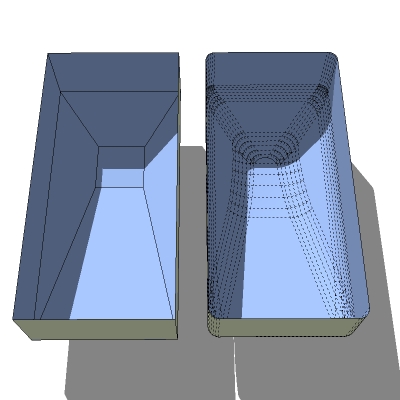
The settings were a radius of 3" for the corners with 6 segments to the curve. You'll need to select the base plus the 4 vertical edges at the corners. If you select the actual side faces, the plugin will round to top corners too. In case it's not clear, you start wih a coffin-shaped cuboid with no round edges at all. The plugin does it all.<img src="/uploads/imported_attachments/nkhr_bathtub_thumb.jpg" alt="bathtub_thumb.jpg" class=" img-fluid img-markdown" /></p>
<p dir="auto">If I've got it wrong and the base actually tapers in a kind of inverse pyramid towards the drain, then the same plugin will result in something like the second image. You may have to do an Intersect (with itself) and a clean up to remove unwanted flanges produced by a mismatch between the surfaces available and what radius you have specified for the rounded corners.</p>
<hr />
<p dir="auto"><img src="/uploads/imported_attachments/HwRK_bathtub_thumb.jpg" alt="bathtub_thumb.jpg" class=" img-fluid img-markdown" /></p>
]]></description><link>https://community.sketchucation.com/post/1316735</link><guid isPermaLink="true">https://community.sketchucation.com/post/1316735</guid><dc:creator><![CDATA[Alan Fraser]]></dc:creator><pubDate>Sun, 18 Mar 2012 08:05:24 GMT</pubDate></item></channel></rss>