sketchucation logo sketchucation
    • 登入
    Oops, your profile's looking a bit empty! To help us tailor your experience, please fill in key details like your SketchUp version, skill level, operating system, and more. Update and save your info on your profile page today!
    🔌 Smart Spline | Fluid way to handle splines for furniture design and complex structures. Download

    [Plugin] Lattice Maker

    已排程 已置頂 已鎖定 已移動 Plugins
    149 貼文 69 Posters 347.5k 瀏覽 68 Watching
    正在載入更多貼文
    • 從舊到新
    • 從新到舊
    • 最多點贊
    回覆
    • 在新貼文中回覆
    登入後回覆
    此主題已被刪除。只有擁有主題管理權限的使用者可以查看。
    • TIGT 離線
      TIG Moderator
      最後由 編輯

      It appears under the 'Plugins' menu - this is called the 'Extensions' menu in the newer versions of SketchUp.
      One reason it might not appear in the menu is if you have set the Extension Manager > Loading Options to something other than 'Unrestricted' - it's an older plugin and its signature might be out of date - but that won't stop it loading and running OK ...

      TIG

      1 條回覆 最後回覆 回覆 引用 0
      • J 離線
        jamalaldin
        最後由 編輯

        That looks like fun.

        1 條回覆 最後回覆 回覆 引用 0
        • K 離線
          Kuzangy
          最後由 編輯

          Thanks but plugin doesn't work. SketchUp 2020.
          Plugin show up on extension administration but dont extension window.

          Any other plugin?.

          1 條回覆 最後回覆 回覆 引用 0
          • Rich O BrienR 離線
            Rich O Brien Moderator
            最後由 編輯

            It works...

            SketchUp_8FrT3FFikM.png

            ...maybe your selection is not correct?

            Download the free D'oh Book for SketchUp 📖

            1 條回覆 最後回覆 回覆 引用 0
            • ntxdaveN 離線
              ntxdave
              最後由 編輯

              I just installed installed this plugin. 👍

              Now a question, is there a way to modify the list of colors (especially the list of pane colors) or adjust the color that I select?

              Press F1...thank me later

              1 條回覆 最後回覆 回覆 引用 0
              • TIGT 離線
                TIG Moderator
                最後由 編輯

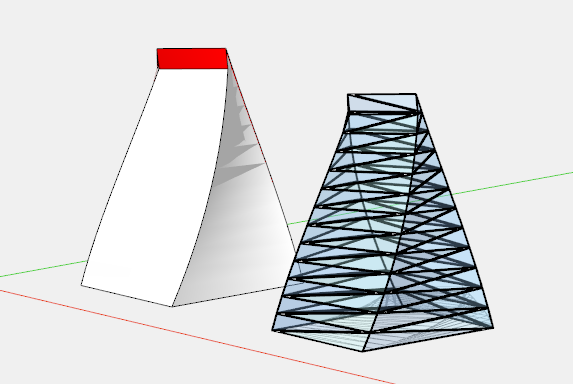
                The materials list is fixed, but it'd be easy enough to edit the 'Glass' material's RGB & Opacity [this is kept for that model across sessions] as you wish or edit the containers and select all of one material and replace it with another already in your model's materials collection...
                You could edit the RB file - this will break any signing, but if your Extension Manager's Loding Policy is se to 'Unrestricted' it will be OK...
                In the RB there is a definition of glass from line #276
                mat.color=[150,200,250] mat.alpha=0.30
                Edit that as desired

                TIG

                1 條回覆 最後回覆 回覆 引用 0
                • T 離線
                  thomasletor Newcomers
                  最後由 編輯

                  Hi, is Lattice maker available on ios ? It's not integrating to my extensions. I'm using sketchup pro 2023 for mac. Thank you

                  1 條回覆 最後回覆 回覆 引用 0
                  • Dave RD 離線
                    Dave R
                    最後由 編輯

                    @thomasletor said:

                    Hi, is Lattice maker available on ios ?

                    iOS is the operating system for iPad. SketchUp for iPad doesn't have any way to use extensions.

                    @thomasletor said:

                    It's not integrating to my extensions.

                    What exactly do you mean by this? Did you install the extension correctly? Did you restart SketchUp after installing it?

                    Etaoin Shrdlu

                    %

                    (THERE'S NO PLACE LIKE)

                    G28 X0.0 Y0.0 Z0.0

                    M30

                    %

                    1 條回覆 最後回覆 回覆 引用 0
                    • TIGT 離線
                      TIG Moderator
                      最後由 編輯

                      As Dave says, your profile is confusing.
                      Let's assume you have recent Pro version of SketchUp.
                      If you download the LatticeMaker RBZ you then need to install it from within SketchUp using the ExtensionManager's Install... button.
                      If you have the SketchUcation Tools installed then you can auto-install it from its ExtensionStore dialog, sidestepping the RBZ download steps.
                      Its entry should the appear in the Extensions [aka Plugins] menu, and work if you have a suitable preselection...
                      Read the guidance notes.

                      TIG

                      1 條回覆 最後回覆 回覆 引用 0
                      • TIGT 離線
                        TIG Moderator
                        最後由 TIG 編輯

                        PS:
                        Something else to bear in mind...
                        LatticeMaker is an older script which hasn't been 'signed' to the latest standards for some time - however, this will not prevent it from working, but you will perhaps need to have your ExtensionManager's Loading-Policy set to 'Unrestricted' so it appears in the appropriate menu as SketchUp [re]starts...
                        Restart SketchUp to ensure it's show in the menu and context-menu [if there's a suitable selection]

                        TIG

                        1 條回覆 最後回覆 回覆 引用 0
                        • O 離線
                          OHRLEE
                          最後由 編輯

                          Thanks so much, its very useful.

                          1 條回覆 最後回覆 回覆 引用 0
                          • 1
                          • 2
                          • 3
                          • 4
                          • 5
                          • 6
                          • 7
                          • 8
                          • 2 / 8
                          • 第一個貼文
                            最後的貼文
                          Buy SketchPlus
                          Buy SUbD
                          Buy WrapR
                          Buy eBook
                          Buy Modelur
                          Buy Vertex Tools
                          Buy SketchCuisine
                          Buy FormFonts

                          Advertisement