sketchucation logo sketchucation
    • 登入
    Oops, your profile's looking a bit empty! To help us tailor your experience, please fill in key details like your SketchUp version, skill level, operating system, and more. Update and save your info on your profile page today!
    🔌 Smart Spline | Fluid way to handle splines for furniture design and complex structures. Download

    [Plugin] ExtrudeTools - Full Set

    已排程 已置頂 已鎖定 已移動 Plugins
    636 貼文 178 Posters 791.0k 瀏覽 175 Watching
    正在載入更多貼文
    • 從舊到新
    • 從新到舊
    • 最多點贊
    回覆
    • 在新貼文中回覆
    登入後回覆
    此主題已被刪除。只有擁有主題管理權限的使用者可以查看。
    • TIGT 離線
      TIG Moderator
      最後由 編輯

      @unknownuser said:

      Do you think that you could add the date to the topic title when you update them? I find myself checking it daily to see if you've updated the toolset.
      With the frequency that you bang out revisions it's hard to keep up with you 😲

      The zip has the date as its name e.g. extrudeTools_20100312.zip and I do add an announcement to say it's changed and a link back to the base page, and I do add announcements to the individual tools' page too - linking back to their base pages, which in turn link back to the zipped set's base page. I stopped adding the update's date or version rference to the threads title because I kept forgetting to change it when I updated the zip ! 😒 By putting the date in the zip's name I avoid that error...
      So the answer to your request is... 'No' 😮 😉

      TIG

      1 條回覆 最後回覆 回覆 引用 0
      • Rich O BrienR 離線
        Rich O Brien Moderator
        最後由 編輯

        I suppose i was being a little unreasonable 😲

        Must organize myself a bit better 😉

        Download the free D'oh Book for SketchUp 📖

        1 條回覆 最後回覆 回覆 引用 0
        • TIGT 離線
          TIG Moderator
          最後由 編輯

          Here is an updated set http://forums.sketchucation.com/viewtopic.php?p=217663#p217663
          Several of the files had a potential [but very rare] glitch in calling sub-methods - it has now been fixed.
          The very few users who reported these problems should try this update and see if they now have a fully working set...
          Feedback please. 😕

          TIG

          1 條回覆 最後回覆 回覆 引用 0
          • TIGT 離線
            TIG Moderator
            最後由 編輯

            Here's another update http://forums.sketchucation.com/viewtopic.php?p=217663#p217663
            EEbyLathe has been changed - see its updated help thread for full details...
            It now has dynamic angle and segment [45 or 9s] entry in the VCB and a 'ghost display' of what it'll make OR if you enter 0 as the angle you can pick two points to set the rotation angle, with <Alt> to toggle <>180 degrees and <Shift> to toggle c/clockwise...
            The affected 'lingvo' files will be updated shortly...

            TIG

            1 條回覆 最後回覆 回覆 引用 0
            • ken28875K 離線
              ken28875
              最後由 編輯

              Great! Thank you, Sir. 👍

              Follow Your Dreams.

              1 條回覆 最後回覆 回覆 引用 0
              • TIGT 離線
                TIG Moderator
                最後由 編輯

                Here's the update with the lingvo files updated for EEbyLathe http://forums.sketchucation.com/viewtopic.php?p=217663#p217663 🤓
                I suspect that at least he Chinese one could do with some work 😳

                TIG

                1 條回覆 最後回覆 回覆 引用 0
                • boofredlayB 離線
                  boofredlay
                  最後由 編輯

                  Thanks TIG.

                  Can I ask you to change the title of your first post with the date when you update the scripts? It would be helpful to all to know when the last update was without sifting through the threads.

                  http://www.coroflot.com/boofredlay

                  1 條回覆 最後回覆 回覆 引用 0
                  • TIGT 離線
                    TIG Moderator
                    最後由 編輯

                    @unknownuser said:

                    Thanks TIG.

                    Can I ask you to change the title of your first post with the date when you update the scripts? It would be helpful to all to know when the last update was without sifting through the threads.

                    You could always just look at the first post in this thread - the zip file has the date on the end of it...
                    I stopped adding the version/date onto the post title as I often forgot it and caused even more confusion ?

                    TIG

                    1 條回覆 最後回覆 回覆 引用 0
                    • boofredlayB 離線
                      boofredlay
                      最後由 編輯

                      One could do that yes but I don't read the threads every time there is a new reply. It would be nice to look at the topic title and see if there is a more recent update of the plugin.

                      Just a thought.

                      http://www.coroflot.com/boofredlay

                      1 條回覆 最後回覆 回覆 引用 0
                      • TIGT 離線
                        TIG Moderator
                        最後由 編輯

                        @unknownuser said:

                        One could do that yes but I don't read the threads every time there is a new reply. It would be nice to look at the topic title and see if there is a more recent update of the plugin.

                        Just a thought.

                        I would forget to do it now and again - but I always post to bump the topic and link that to the updated first page....

                        TIG

                        1 條回覆 最後回覆 回覆 引用 0
                        • M 離線
                          minka
                          最後由 編輯

                          I am new to this forum. Can any please explain how to download the file extrudeTools_20100330b.zip? I tried clicking on it but nothing happens...
                          Thanks

                          1 條回覆 最後回覆 回覆 引用 0
                          • TIGT 離線
                            TIG Moderator
                            最後由 編輯

                            @minka said:

                            I am new to this forum. Can any please explain how to download the file extrudeTools_20100330b.zip? I tried clicking on it but nothing happens...
                            Thanks

                            If you right-click in the link to the zip file you should get 'Save_Link_As' or something similar - depending on your browser type.
                            Download the zip file to say your Desktop.
                            Let it download, then select that new zip file and right-click. you should get an 'Extract...' option [again depending on your 'zip/unzip' application]...
                            Extract all of the 'loose' files and also all of the files inside their sub-folders into a new folder on your Desktop.
                            Open the Sketchup ../Plugins/folder.
                            Open the new folder with these new unzipped files & sub-folders in it.
                            "Select All" and then Copy+Paste them into the ../Plugins/ folder, overwriting any existing files with the same names that are already in there [in your case there should be any as you haven't done this before ?!]
                            Restart Sketchup and the tools should now be available to you - in this case in the Plugins Menu under Extrusion Tools... and via toolbar which you activate the one time from View > Toolbars >Extrusion Tools
                            All scripts have instructions either in their thread[s] [or in the start of the .rb files themselves [which can be read with Notepad.exe]]...

                            TIG

                            1 條回覆 最後回覆 回覆 引用 0
                            • simon le bonS 離線
                              simon le bon
                              最後由 編輯

                              Dear TIG,

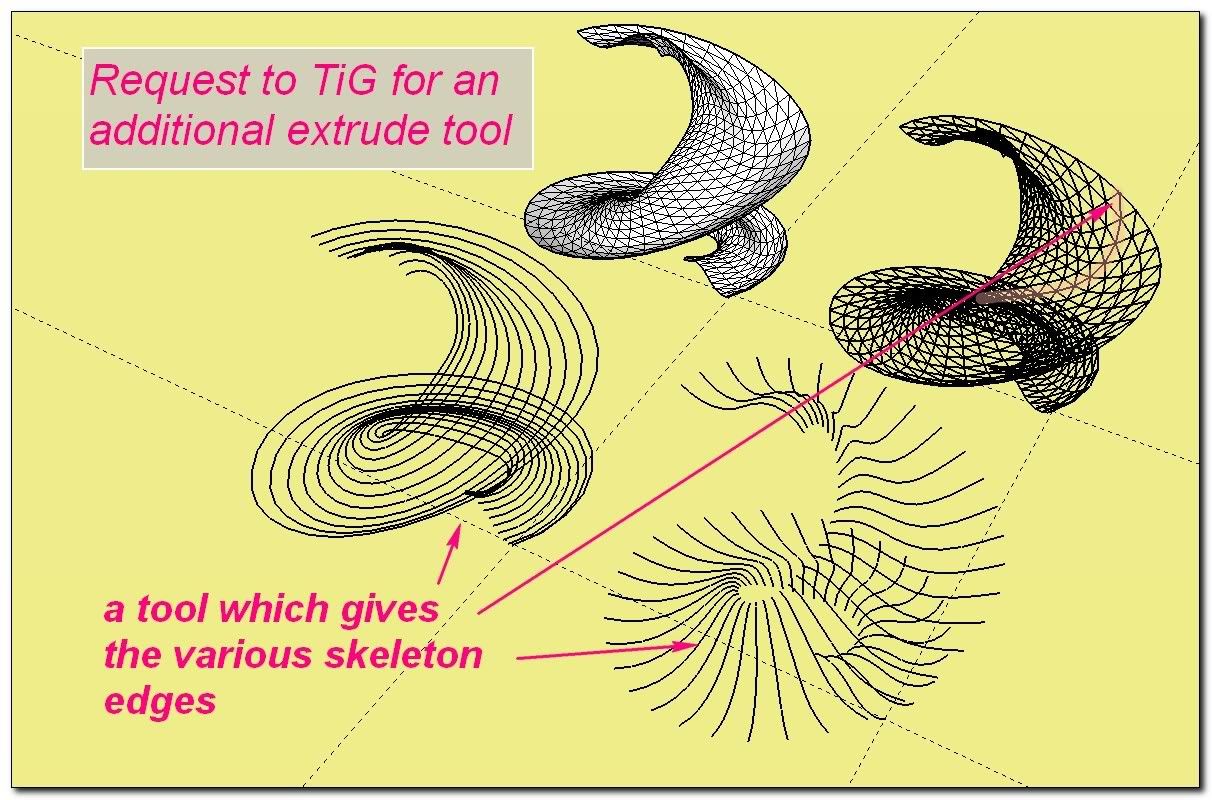
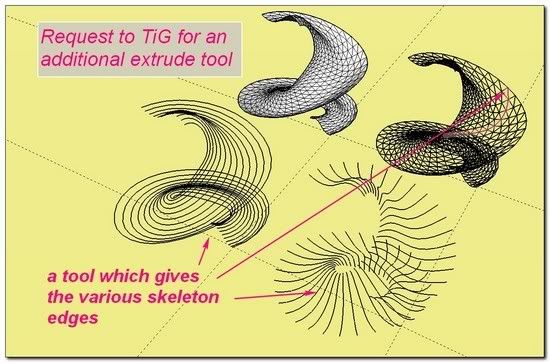
                              I would like make a request to you for a new extrude tool (or at least for an available option).

                              A tool to sort the edges skeleton in their own family.
                              in a kind of way this option already exists with ExtrudeEdgesByRailsByFaces which makes the separation between "Rails" and "Profiles" families...

                              Here handmade isolation of "rails" and "profiles" with eraser tool on an initial skin done with Extrude edges by rails
                              http://i274.photobucket.com/albums/jj245/Spendauballet/SketchUp/TIGeebfbr_042_th.jpg

                              It would be a "generous tool" which would offer a great base to work with various tools (besides yours 😉 ).


                              http://i274.photobucket.com/albums/jj245/Spendauballet/SketchUp/TIGeebfbr_043_th.jpg


                              http://i274.photobucket.com/albums/jj245/Spendauballet/SketchUp/TIGeebfbr_045_th.jpg

                              with my hope you will find this request important as me, hope also it is not a too great duty I'm asking for.
                              ++simonlebon

                              1 條回覆 最後回覆 回覆 引用 0
                              • simon le bonS 離線
                                simon le bon
                                最後由 編輯

                                Dear TIG,

                                No reply from you. I feel a bit confused/disappointed . 😳 Am I wrong with something?

                                http://i274.photobucket.com/albums/jj245/Spendauballet/SketchUp/TIGeebfbr_046_th.jpg

                                I'm just trying to get all the benefits of your tools and communicate the results here in SCF!

                                Ok, please forget my demand. There is already a pretty fast solution to pick up the families curves.

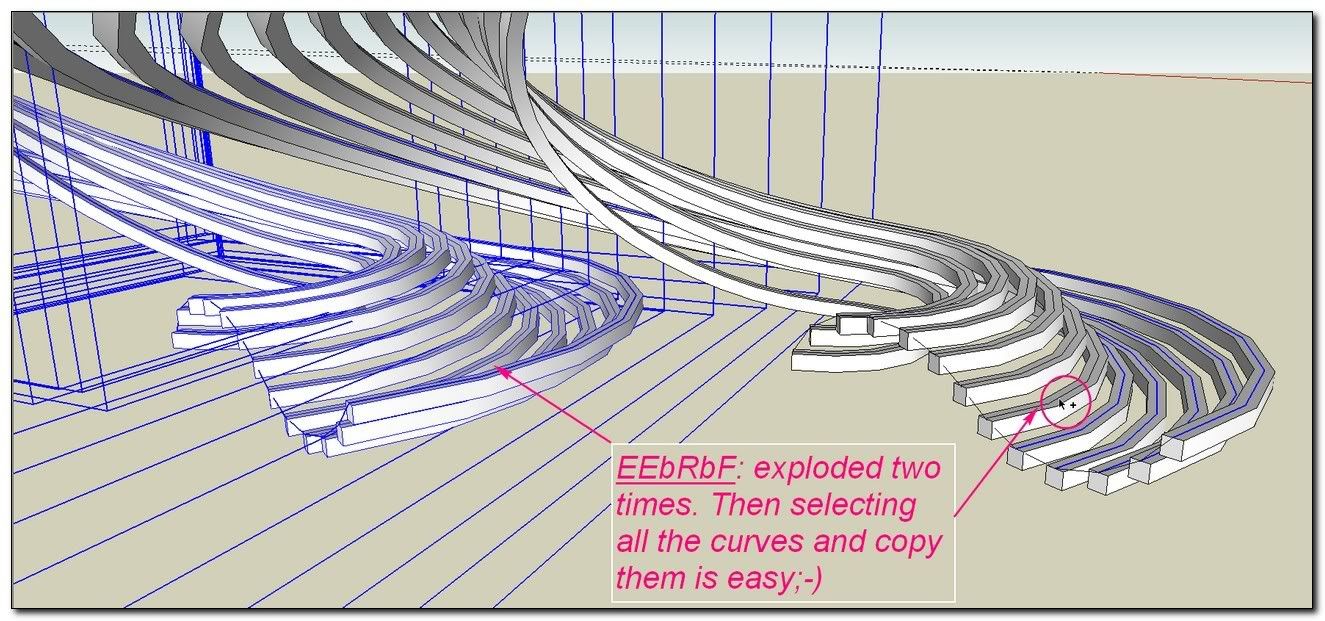
                                1. using EEbRbF one time for the profiles, one time for the rails.
                                2. explode the resulting groups and explode all the single curves groups.
                                3. select by hand all the welded curves (CTRL)and copy them
                                4. one time for Profiles family, and the same for Rails family.
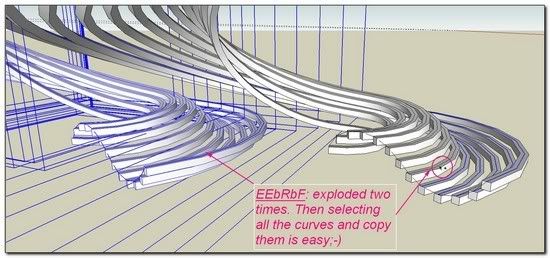
                                  http://i274.photobucket.com/albums/jj245/Spendauballet/SketchUp/TIGeebfbr_047_th.jpg

                                  Then we can mix the power of plenty of tools...

                                with my sympathy,
                                *simon

                                1 條回覆 最後回覆 回覆 引用 0
                                • TIGT 離線
                                  TIG Moderator
                                  最後由 編輯

                                  Sorry Simon 😳 , but I've been a bit preoccupied lately... it is quite easy to do this and I am thinking of including an option with EEbyRails to allow you to keep only the Rail-paths, Profile-paths or Rail+Profile-paths... OR I might just make the 'pipe-dream' ExtrudeEdgesToLattice tool... That would do what you want... but also perhaps let you apply a lattice to the untriangulated mesh's faces - using an desired offset from each face's edges and also PushPulled up/down by desired amount[s] too...
                                  I am very 'bogged down' at the moment but I AM thinking about it...

                                  TIG

                                  1 條回覆 最後回覆 回覆 引用 0
                                  • simon le bonS 離線
                                    simon le bon
                                    最後由 編輯

                                    Thank you TIG for your word, I feel better now.

                                    What you are planning is very exciting .

                                    @unknownuser said:

                                    it is quite easy to do this and I am thinking of including an option with EEbyRails
                                    👍

                                    @unknownuser said:

                                    OR I might just make the 'pipe-dream' ExtrudeEdgesToLattice tool...
                                    👍 👍

                                    @unknownuser said:

                                    but also perhaps let you apply a lattice to the untriangulated mesh's faces - using an desired offset from each face's edges and also PushPulled up/down by desired amount[s] too..

                                    It is now going to be hard to wait for.

                                    you are the

                                    http://i274.photobucket.com/albums/jj245/Spendauballet/generalPicts/gnie.gif
                                    of this place.

                                    😉 simon

                                    1 條回覆 最後回覆 回覆 引用 0
                                    • L 離線
                                      Landie
                                      最後由 編輯

                                      Thankyou for sharing. 😍

                                      http://www.smithdimes.co.uk

                                      1 條回覆 最後回覆 回覆 引用 0
                                      • TIGT 離線
                                        TIG Moderator
                                        最後由 編輯

                                        New updated set available here... http://forums.sketchucation.com/viewtopic.php?p=217663#p217663

                                        Brand new tool ExtrudeEdgesByRailsToLattice added.
                                        [It has basic EN-US/FR/ES lingvo files...] http://forums.sketchucation.com/viewtopic.php?p=242239#p242239

                                        Replacement ES lingvo files for all tools included [from Defisto]; and some new FA lingvo files for some tools added [through Majid] - Thanks to them! 😄

                                        Minor adjustments:
                                        EEbyEdges tool now exits gracefully.
                                        A few scripts have had the missing "require 'deBableizer.rb'" added.
                                        RickW's ' offset.rb' method-only script is now included in the set - because it's needed by EEbyRailsToLattice...

                                        🤓

                                        TIG

                                        1 條回覆 最後回覆 回覆 引用 0
                                        • mitcorbM 離線
                                          mitcorb
                                          最後由 編輯

                                          Again, TIG:
                                          Thank you for your talents and contributions.

                                          I take the slow, deliberate approach in my aimless wandering.

                                          1 條回覆 最後回覆 回覆 引用 0
                                          • W 離線
                                            watkins
                                            最後由 編輯

                                            Dear TIG,

                                            You appear to be using version 1.0 of offset.rb. There is a later version, V2.1 (see the attached). Is it okay to use the later version with your scripts?

                                            Regards,
                                            Bob


                                            offset.rb

                                            1 條回覆 最後回覆 回覆 引用 0
                                            • 1
                                            • 2
                                            • 25
                                            • 26
                                            • 27
                                            • 28
                                            • 29
                                            • 30
                                            • 31
                                            • 32
                                            • 27 / 32
                                            • 第一個貼文
                                              最後的貼文
                                            Buy SketchPlus
                                            Buy SUbD
                                            Buy WrapR
                                            Buy eBook
                                            Buy Modelur
                                            Buy Vertex Tools
                                            Buy SketchCuisine
                                            Buy FormFonts

                                            Advertisement